
Ready to win your next contract? This free bid quote template is an editable Excel spreadsheet (.xlsx) that helps contractors, vendors and service providers submit a clear, professional bid with itemized pricing and terms. Download it, fill in your numbers and send a polished bid quotation to your client in minutes instead of building one from scratch every time.
Using a bid quote template also means every tender response follows the same reliable structure, so nothing important is left out when deadlines are tight.
Free Bid Price Calculator
Add your direct costs, overhead and profit margin to calculate a bid price before you fill in the bid quote template.
| Cost item | Qty | Unit cost | Amount | Remove |
|---|
Results are estimates for planning only. Check every figure before sending a quote. Nothing you type is saved or sent anywhere.
What Is a Bid Quote?
A bid quote, also called a bid quotation or bid price, is a formal offer to complete a specific job or supply specific goods for a stated price. It is normally submitted in response to a request for bids, a tender or a request for quotation (RFQ). The buyer collects several bids, compares them on price, scope, timeline and reliability, and then chooses the supplier who offers the best overall value. Because a bid is a written promise, it needs to be accurate, complete and easy to read.
Bid Quote vs. Estimate vs. Proposal
These three documents are often confused. An estimate is an approximate calculation of cost and can change as the work unfolds. A bid quote is a firm price for a defined scope of work, usually valid for a set number of days. A proposal is a longer document that adds your approach, experience and references on top of the price. Use a bid quote template when the client already knows what they want and mainly needs a competitive, clearly itemized price.
What to Include in a Bid Quote
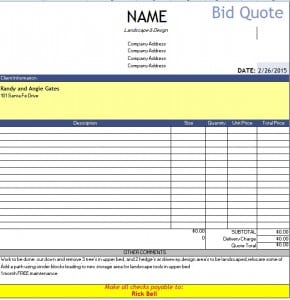
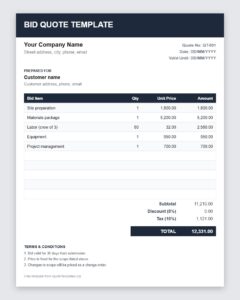
A strong bid quote template should contain the following elements so the buyer never has to chase you for missing information:
- Your business details: company name, logo, address, phone number, email and license or registration number if relevant.
- Client details: the name of the person or organization, the project name and the site address.
- Bid number and date: a unique reference makes follow-up and record keeping easier.
- Scope of work: a short description of exactly what is included and, just as important, what is excluded.
- Itemized pricing: labor, materials, equipment, subcontractors, permits, delivery and any other cost lines with quantities and unit prices.
- Total bid price: subtotal, taxes, discounts and the final amount.
- Timeline: the start date, key milestones and the expected completion date.
- Payment terms: deposit, progress payments, due dates and accepted payment methods.
- Validity period: how long the price stays valid, for example 30 days, since material and labor costs change.
- Acceptance section: a line for the client’s signature and date.
How to Prepare a Winning Bid Quote Step by Step
- Read the request carefully. Highlight every requirement, deadline and submission rule. Missing a single instruction can get a good bid rejected.
- Visit the site or clarify the scope. Ask questions early so your numbers rest on facts rather than assumptions.
- Calculate your true costs. Add up materials, labor hours, equipment, subcontractors, insurance, permits and travel. Do not forget overhead.
- Add a fair margin. Your profit should cover risk and growth while staying competitive with other bidders.
- Enter everything in the template. Replace the sample rows with your own items, check that the totals calculate correctly and review the spelling of names and addresses.
- State your terms and validity. Spell out payment terms, exclusions and the date the bid expires.
- Send it on time and follow up. Submit before the deadline and contact the buyer a few days later to confirm receipt and answer questions.
Pricing Tips for Competitive Bids
Winning a bid does not always mean being the cheapest. Buyers look for confidence that the job will be finished on time and on budget. Break the price into clear lines so the client can see where the money goes. Offer options where it makes sense, such as a standard and a premium version of the work. If you include allowances for items that are still undecided, say so plainly. Finally, avoid unrealistic low-ball pricing; a bid that is too low often leads to change orders, disputes and lost profit.
Common Bid Quote Mistakes to Avoid
The most common problems are vague scopes, missing exclusions, arithmetic errors, forgotten taxes, no expiry date and unclear payment terms. Another frequent issue is sending a document that looks rushed. A clean layout with consistent fonts, aligned numbers and your logo tells the client you will run the project with the same care. Reusing a well-built template removes most of these risks because the structure is already correct and only the details change.
Who Can Use a Bid Quote Template?
General contractors, electricians, plumbers, roofers, landscapers, cleaning companies, IT service providers, event vendors, printers, freelancers and small suppliers all use bid quotes. Purchasing teams also use the same layout to compare vendor offers side by side. Because the file is an ordinary Excel workbook, you can add rows, change labels, insert your logo and adapt the formulas to suit any industry.
How to Use This Bid Quote Template
Download the spreadsheet using the button below, open it in Microsoft Excel or a compatible spreadsheet program and save a copy under the project name. Type your company and client details, replace the sample line items with your own, and let the totals update. When you are finished, print the sheet, or save it as a PDF and email it to the client. Keep the blank original so you can start each new bid from a clean file.
How to Write a Bid Quote That Stands Out
- Read the bid documents fully and list every requirement and deadline.
- Visit the site or ask clarifying questions before you price.
- Price each item carefully and double-check quantities.
- Follow the buyer’s format and numbering where requested.
- Clearly state assumptions and exclusions.
- Have someone else review the bid for errors before submission.
A careful, compliant bid quotation is often more persuasive than simply the lowest number.
Bid Quote Template: Key Terms Explained
- RFQ or tender: A formal request from a buyer inviting suppliers to submit prices.
- Bid bond: A guarantee some buyers require that a bidder will honour their bid if selected.
- Lump sum bid: A single total price for the whole scope of work.
- Unit price bid: A bid priced per unit, such as per metre or per item, with quantities estimated by the buyer.
Download Bid Quote Template

Download Free Bid Quote Template (Excel)
Frequently Asked Questions About Bid Quotes
What is the difference between a bid and a quote?
A quote is a price given to a customer who has asked how much something will cost. A bid is a competitive offer submitted against other suppliers for the same job. In practice the documents look very similar, and this template works for both.
Is a bid quote legally binding?
Often it is, once the client accepts it in writing and the validity period has not expired. That is why the scope, price and terms must be accurate. If you need certainty, ask a legal professional to review your standard terms.
How long should a bid quote stay valid?
Thirty days is common, but shorter periods suit jobs with volatile material prices. Always print the expiry date on the document.
Can I edit this template in Google Sheets or another program?
Yes. The file is a standard .xlsx workbook, so it opens in Microsoft Excel and in most spreadsheet programs that support that format.
Should I include taxes and discounts in a bid?
Yes. Show the subtotal, any discount, the tax amount and the final total on separate lines so the client can see exactly how the price was calculated.
What should I do after sending a bid?
Confirm receipt, be ready to answer questions and offer to clarify the scope. A short, polite follow-up a few days later shows interest without pressuring the buyer.
Can I use this as a tender quotation template?
Yes. Add the tender reference, required forms and compliance notes, and it works well for formal tender responses.
Related Free Templates
Looking for a different format? You may also find these useful: 6+ Free Construction Quote Templates, 5+ Construction Estimate Templates, 2 Free Price Quotation Templates. You can also browse every template in our Bid & Tender Quotes and Construction Quotes categories to find the layout that suits your business best.
Download Your Free Bid Quote Template Today
A bid quote template saves time, reduces mistakes and helps you present every offer with confidence. Download the free file above, add your own details and branding, and keep a clean master copy for future use. With a consistent, professional document ready to go, you can answer each request faster and give customers everything they need to say yes.
