
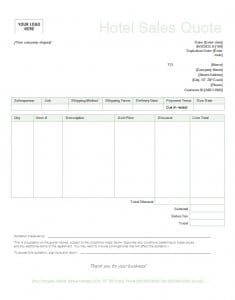
Winning a sale often comes down to how quickly and clearly you send a price. This free sales quote template gives you a polished, editable Word document (.dotx) for creating professional sales quotations, quote letters and price offers for customers in any industry. The sample layout shown below was designed for a hotel, and you can adapt it to any product or service by changing the wording and line items.
What Is a Sales Quote?
A sales quote, also called a sales quotation, is a document in which a seller states the price and terms for specific goods or services. It usually includes a quote number, the date, the buyer’s details, a list of items with quantities and unit prices, taxes, delivery terms and how long the offer stays valid. Customers use quotes to compare suppliers and plan their budgets, and sellers use them to turn inquiries into orders.
Sales Quote vs. Request for Quote
A request for quote (RFQ) is sent by the buyer to one or more suppliers asking for pricing. The sales quote is the supplier’s reply. Answering an RFQ promptly with a well-formatted quotation shows professionalism and improves your chances of closing the deal. If a buyer contacts you informally, you can also send a quote proactively to move the conversation forward.
Why a Professional Sales Quote Matters
A sales quotation can make or break a transaction. A clear, accurate document tells the buyer you are organized and trustworthy, while a messy or incomplete one raises doubts. A good quote also protects you: because the price, quantities and conditions are in writing, disagreements are less likely. Using a template ensures that every quote you send is complete, consistent and quick to produce.
What to Include in a Sales Quotation
- Company information: name, logo, address, phone, email and website.
- Customer information: the buyer’s name, company and address.
- Quote number and dates: issue date and expiry date.
- Product or service list: clear descriptions, quantities and unit prices.
- Discounts: volume, seasonal or early-payment discounts, shown as separate lines.
- Taxes and additional charges: sales tax, shipping, installation or service fees.
- Total amount: the final price the customer would pay.
- Delivery and payment terms: when the goods arrive, how payment is made and any deposit required.
- Conditions: warranty, returns, cancellation and other important terms.
- Acceptance: a space for the customer to sign or confirm by reply.
How to Write a Sales Quote That Wins Business
- Understand what the customer needs. Ask about quantities, deadlines and priorities so your quote answers the real question.
- Price with confidence. Include your costs and a fair margin, and be ready to explain the value behind the number.
- Use clear, simple language. Avoid jargon so the customer can understand every line.
- Highlight benefits. Mention what makes your offer stronger, such as quality, support, warranty or fast delivery.
- Set a deadline. A validity date encourages the customer to decide instead of postponing.
- Follow up. A friendly message a few days later shows interest and gives you the chance to answer questions.
Sales Quote Best Practices
Respond quickly, because the first supplier to reply with a clear price often gets the customer’s attention. Keep your design clean, with your logo at the top, aligned columns and a visible total. Proofread names, numbers and dates. If you offer choices, present them as options so the customer can compare them easily. Keep a copy of every quote you send, and record whether it was accepted, declined or ignored, so you can improve your pricing and follow-up over time.
Who Can Use This Sales Quote Template?
Sales representatives, shop owners, wholesalers, hotels, event organizers, agencies, freelancers and service businesses can all use a sales quote template. The Word format makes it easy to edit text, change fonts, add tables and insert your logo without special software skills.
Follow-Up and Record Keeping for Sales Quotes
Sending the quote is only half the job. Note the date you sent it, the expiry date and the name of the person who received it. A short follow-up message two or three days later, offering to clarify any line, often makes the difference between a quote that is forgotten and one that becomes an order. Store every quotation in a folder named after the customer, and keep a simple log of accepted, declined and pending quotes. Over time this record shows which products, prices and customer types convert best, so you can improve your future offers.
How to Use This Template
Download the file using the button below and open it in Microsoft Word. Since it is a template file (.dotx), Word will open a new document based on it, leaving the original untouched. Replace the sample text with your own information, adjust the items and prices, and save the document with the customer’s name. Send it as a PDF by email or print it for delivery.
Download Sales Quote Template

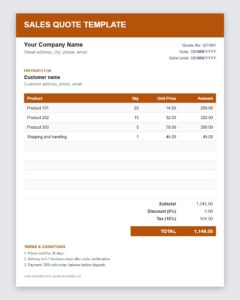
Download Free Sales Quote Template (Excel)
Frequently Asked Questions About Sales Quotes
What is the difference between a sales quote and an invoice?
A sales quote is an offer made before the sale, while an invoice is a request for payment after the sale. The quote can later become the basis for the invoice.
Is a sales quotation the same as a sales quote?
Yes. The terms are used interchangeably to describe a document that states the price and terms for goods or services.
How long should a sales quote be valid?
Fifteen to thirty days is typical. Shorter periods make sense when prices change quickly.
Can I use this template if I do not run a hotel?
Yes. The sample layout is only an example. Replace the wording and line items with your own products or services.
Can a customer accept a quote by email?
Yes, in most cases a written reply confirming acceptance is sufficient, but you may also ask for a signature on the quote. Check your local rules or company policy if you need formal contracts.
Do I need a lawyer to write my quote terms?
Simple quotes rarely do, but for high-value or complex sales it is wise to have a legal professional review your standard terms and conditions.
