
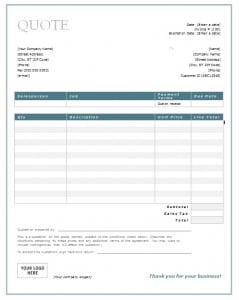
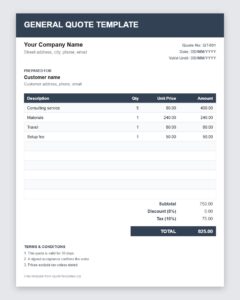
One quote layout for almost any business. This free general quote template is a versatile Word template (.dotx) for creating professional price quotes for products, services and projects. Download it, add your business details and send a clear business quotation in minutes, whatever your industry.
What Is a General Quote?
A general quote, also called a business quote or general quotation, is a document that states the price and terms for goods or services without being tied to one specific industry. It contains the essentials that every quote needs: who is offering, who the offer is for, what is included, how much it costs and how long the offer lasts. Because the structure is universal, a general quote template works for retailers, consultants, tradespeople, agencies, manufacturers and freelancers alike.
Why Use a General Quote Template?
If you sell more than one kind of product or service, you need a layout you can adapt quickly. A general template saves time because you only replace the details, not the structure. It also keeps your paperwork consistent, which helps customers recognize your brand, and it reminds you to include important items such as the validity period and payment terms. For new businesses, it provides a professional starting point without the need to hire a designer.
What to Include in a General Business Quote
- Business information: name, logo, address, phone number, email and website.
- Customer information: name, company and contact details.
- Quote number and date: for easy reference and record keeping.
- Description of goods or services: a clear list with quantities and prices.
- Subtotal, discounts and taxes: presented on separate lines.
- Total price: the final amount the customer is asked to approve.
- Delivery or completion date: when the customer can expect the goods or results.
- Payment terms: deposits, due dates and accepted methods.
- Validity period: the date after which the quote expires.
- Terms and conditions: warranty, returns, cancellation or liability notes.
How to Write a General Quote Step by Step
- Clarify the request. Confirm what the customer wants, in what quantity and by when.
- Work out your price. Include costs, overhead and a fair profit.
- Open the template. Because it is a .dotx file, Word opens a fresh copy and leaves the original intact.
- Fill in the details. Add the customer’s information, the item list and the totals.
- Add terms and validity. Make expectations clear from the start.
- Proofread and send. Check spelling, numbers and dates, then email a PDF or print the quote.
How to Customize the Template for Your Industry
Change the wording to match how your customers speak, for example Job Quote, Project Quote or Service Proposal. Add columns for item codes, hours or delivery dates if they matter to your business. Insert your logo, adjust the colors to match your branding and save the customized file as your own master template. If you serve different types of customers, create a few variations, such as a short version for small orders and a longer one for larger projects.
Tips for Making Your Quote Stand Out
Respond quickly, because speed shows that you value the customer’s time. Keep descriptions specific and avoid vague terms. Point out benefits, such as quality guarantees or free support, so the customer sees value beyond the price. Include a friendly thank-you note and clear instructions on how to accept the quote. If you offer options, present them side by side so the customer can compare and choose easily.
Common Mistakes to Avoid
Common mistakes include leaving out an expiry date, forgetting taxes or delivery, using unclear descriptions and making arithmetic errors. Another mistake is failing to keep a record of sent quotes, which makes follow-up difficult. Give every quote a number and save a copy in an organized folder.
Who Can Use This Template?
Small business owners, sales teams, consultants, contractors, freelancers, wholesalers and service providers can all use a general quote template. It is especially helpful when you handle a wide range of requests and need one reliable format.
Sample Notes and Terms for a General Quote
A few standard lines can make your general quote more complete. For payment, you might write: A fifty percent deposit is required to begin, with the balance due on completion. For delivery: Estimated delivery time is ten working days after order confirmation. For validity: This quote is valid for thirty days from the date of issue. Keep the notes short and check them against your business policy so that they are accurate.
Download Free General Quote Templates

Download Free General Quote Template (Excel)
Frequently Asked Questions About General Quotes
What is the difference between a general quote and a specific quote?
A general quote uses a universal layout that suits any industry. A specific quote, such as a construction or hotel quote, includes sections tailored to that field.
Is this general quote template free?
Yes. You can download it, edit it and use it for your business without charge.
What is a .dotx file?
It is a Microsoft Word template. When you open it, Word creates a new document based on the template so the original stays unchanged.
Can I use this template for services and products?
Yes. Edit the item descriptions to list either products, services or a combination of both.
How long should a quote be valid?
Fifteen to thirty days is typical. Use a shorter validity period if your costs change quickly.
Should I send the quote as a PDF?
A PDF keeps your layout intact on every device and prevents accidental edits, so it is the safest format for sending quotes by email.
