
Quote the job before you start it. These 3 free job estimate templates help contractors, freelancers, plumbers, electricians, handymen and service businesses give customers a clear price for labor and materials. Pick the Excel, Word or DOC format that suits you, edit it, and send a professional job estimate in minutes.
What Is a Job Estimate?
A job estimate is an informed calculation of what a piece of work is likely to cost. It breaks the job into labor, materials, equipment and other charges so the customer knows what to expect. Unlike a final invoice, an estimate is offered before the work begins and helps the client decide whether to hire you. A well-prepared estimate demonstrates your experience, because it shows you understand the work involved and have thought about the costs.
Job Estimate vs. Quote vs. Invoice
People often use these words loosely, but they have different meanings. An estimate is an approximation that may change if the job turns out to be larger or smaller. A quote is a firm price for a defined scope. An invoice is the bill you send when the work is done. If you want to protect yourself from surprises, explain in the estimate what could cause the final price to change, such as hidden damage, extra materials or customer-requested changes.
What to Include in a Job Estimate Template
- Your business information: name, logo, address, phone number, email and license number if required.
- Customer information: name, contact details and the address where the work will take place.
- Estimate number and date: so you can track it and match it to the final invoice.
- Description of the work: a clear list of tasks so both sides agree on the scope.
- Labor: estimated hours and hourly rates, or a flat fee per task.
- Materials: each item with its quantity and cost.
- Other charges: equipment rental, disposal, permits, travel and delivery.
- Taxes and total: the subtotal, tax and the estimated total.
- Validity period: how long the estimate is good for.
- Payment terms and signature line: deposit, schedule and an area for the customer to approve.
Estimate Templates for Contractors and Small Businesses
Whether you price a plumbing repair, a painting project, a roofing job, an electrical upgrade or a general contracting task, a fair and competitive estimate builds trust and helps you win work. For example, when a customer asks you to fix a water or gas leak, giving a clear estimate before you start shows professionalism and lets the customer approve the cost. Using a template instead of handwritten estimate books saves time, avoids math errors and keeps a digital record of every estimate you send.
How to Write an Accurate Job Estimate
- Inspect the job. Visit the site if possible, take measurements and ask the customer about their expectations.
- List every task. Break the work into steps so nothing is forgotten.
- Estimate labor. Use your experience or past jobs to judge how many hours each task will take.
- Price the materials. Check current supplier prices and add a small allowance for waste.
- Add overhead and profit. Cover your insurance, tools, vehicle costs and a fair margin.
- Fill in the template. Enter the details, verify the totals and add the validity date.
- Explain and follow up. Walk the customer through the estimate and answer questions.
Choosing the Right Format: Excel, Word or DOC
This page offers three templates in different formats. The Excel version is ideal if you want automatic totals, because the spreadsheet calculates line totals and taxes for you. The Word versions are better if you prefer a document layout with free-form text and simple tables. All three can be edited, saved and printed, so choose the format you are most comfortable with. You can also start with one and copy your details into another if you like its layout better.
Tips for Competitive and Fair Estimates
Your estimate should be fair and competitive with others who may be giving the same client a price. Do not underprice to win the job, because you may end up working for little or no profit. Do not overprice either, because the customer may compare several offers. Be honest about what is included, list exclusions and offer options where possible. If the customer asks for extra work later, provide a written change estimate before doing it.
How to Use These Templates
Download the template you prefer using the buttons below, save a copy on your computer and replace the sample details with your own information. Save each estimate under a new file name for every customer. Print it on your letterhead if you want a polished impression, or save it as a PDF and email it. Keep the blank original as your master template.
Download Free Job Estimate Templates
Job Estimate Template (Excel)
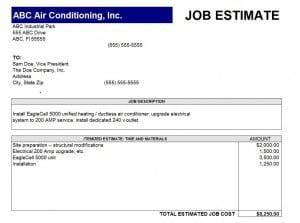

Free Job Estimate Template (Word)
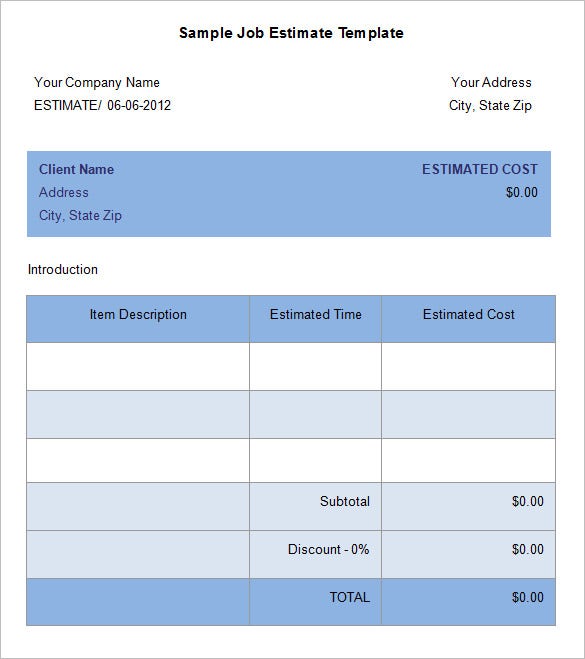
Sample Job Estimate Template for Contractors

Frequently Asked Questions About Job Estimates
Is a job estimate binding?
Usually not. An estimate is an approximation, whereas a quote is a firm price. State clearly on the document whether your figure is an estimate or a fixed quote.
Should I charge for job estimates?
Many contractors provide free estimates for small jobs, while complex projects that require design or long site visits may carry a fee. Tell the customer before you begin.
How long is a job estimate valid?
Thirty days is common, but choose a shorter period if material prices are unstable. Always print the expiry date.
What should I do if the job costs more than my estimate?
Contact the customer as soon as you know, explain the reason and get approval for the additional cost before continuing.
Which template format is best for me?
Choose Excel if you want automatic calculations, or Word if you prefer a simple document. All three templates can be edited and reused.
Can I turn an accepted estimate into an invoice?
Yes. After the work is complete, copy the final labor and material costs into an invoice and add the payment instructions.
