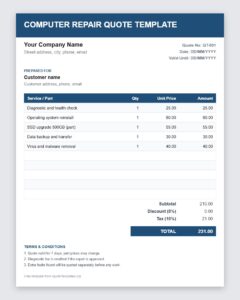
Need to price a repair fast? This free computer service quote template lets IT technicians, repair shops and freelance PC support providers create a clear, professional quote in minutes. It is an editable Word template (.dotx) you can adapt for computer repair, laptop service, virus and malware removal, hardware upgrades, data recovery and network support.
What Is a Computer Service Quote?
A computer service quote is a written estimate of what a repair or IT job will cost before any work begins. It describes the problem reported by the customer, the services you plan to perform, the parts you expect to use and the labor charges, so the customer can approve the price with confidence. Sending a quote first builds trust, prevents billing disputes and shows that your business is organized and transparent.
Why Every Computer Repair Business Needs a Quote Template
Customers who bring in a slow laptop or a dead desktop are often worried about hidden costs. A professional computer repair quote reassures them by showing exactly what they will pay for. A template speeds up the process because the layout, terms and standard services are already in place, so you only enter the details of the current job. It also keeps your pricing consistent between technicians and gives you a written record if the customer later asks what was agreed.
What to Include in a Computer Service Quote
- Business details: your name, logo, address, phone number and email.
- Customer details: name, contact information and, for business clients, the company name.
- Device information: type, brand, model, serial number and operating system.
- Problem description: a short summary of the symptoms or the request, such as a cracked screen, slow performance or a failed hard drive.
- Services to be performed: diagnostics, cleaning, software installation, operating system reinstall, data backup or hardware replacement.
- Parts and hardware: each part with its price, and whether it is new, refurbished or supplied by the customer.
- Labor charges: hourly rate and estimated hours, or a flat fee per service.
- Diagnostic and call-out fees: mention them clearly, along with whether they are credited if the customer approves the repair.
- Taxes and total: subtotal, tax and the final quoted price.
- Validity, turnaround time and warranty: how long the quote stands, when the device will be ready and what guarantee you offer.
Common Computer Services You Can Quote
The template is flexible enough for almost any IT service. Typical jobs include operating system installation, virus and spyware removal, screen and keyboard replacement, RAM and storage upgrades, motherboard and power supply repair, data backup and recovery, printer and network setup, Wi-Fi troubleshooting, and on-site support for small offices. List each service on its own line so the customer understands what every charge covers.
How to Write a Computer Repair Quote Step by Step
- Diagnose the problem. Ask questions, test the device and identify the likely cause before you promise a price.
- List the required work and parts. Be specific so there are no surprises later.
- Estimate the time. Consider testing, waiting for parts and any data backup the customer needs.
- Enter everything in the template. Add the customer and device details, the services, the parts and the labor.
- Explain exclusions. State that additional faults discovered during repair will be quoted separately and approved first.
- Send the quote and get approval. Ask the customer to confirm in writing or by email before you begin.
Tips for Pricing Computer Services
Base your labor rate on your skills, overhead and local market. Keep a price list for common jobs so you can quote quickly. Offer clear choices, such as a basic clean-up or a full upgrade, and let the customer decide. Explain technical terms in plain language, because many customers are not experts. If data is at risk, mention the backup and recovery options and their costs before starting. Being open about pricing is one of the easiest ways to earn repeat business and referrals.
Protect Your Business With Clear Terms
Include short terms on the quote, such as payment due on collection, storage fees for devices left uncollected, no responsibility for data loss unless a backup service is purchased, and the length of your repair warranty. Clear terms protect you and the customer alike, and they are easy to reuse because they stay the same from job to job.
How to Use This Template
Download the file using the button below and open it in Microsoft Word. Because it is a template (.dotx), each time you open it Word creates a new document, so the original stays clean. Fill in the customer, device, services and prices, save the document under the customer’s name and send it by email as a PDF or print it for the counter. Add your logo and standard terms once, and every future quote will already carry them.
Download Computer Service Quote Template





Download Free Computer Repair Quote Template (Excel)
Frequently Asked Questions About Computer Service Quotes
Should I charge for a diagnostic before quoting a repair?
Many shops do, because diagnosis takes time. If you charge a fee, say so upfront and consider crediting it toward the repair if the customer approves the quote.
What if I find another problem after the customer approves the quote?
Stop, explain the new issue and send an updated quote for the extra work. Never add charges without the customer’s approval.
How long should a computer repair quote be valid?
Seven to fourteen days is typical, because part prices and availability can change quickly. Print the expiry date on the quote.
Can I use this template for on-site IT support?
Yes. Add travel or call-out fees and your on-site hourly rate, then list the tasks you will perform at the customer’s location.
What is a .dotx file?
It is a Microsoft Word template. When you open it, Word creates a fresh copy for you to edit, so your original template remains unchanged.
Is this template free to use for my business?
Yes. You can download it, customize it with your details and use it for your own customer quotes at no cost.


