


Send a quote that closes the deal. This free price quotation template is an editable Excel spreadsheet (.xlsx) for small businesses, freelancers, suppliers and contractors who need to present prices clearly and professionally. Download it, list your products or services, and send a polished price quote that makes it easy for customers to say yes.
What Is a Price Quotation?
A price quotation is a formal document in which a seller states what it will charge for specific goods or services and under what conditions. It gives the customer a definite price to accept, compare or negotiate. Once the customer agrees, the quotation usually becomes the basis for the order, the contract and the final invoice. A price quotation is therefore more than a number: it is the first written commitment between you and your customer.
Quotation, Estimate and Invoice: What Is the Difference?
A quotation is a fixed offer, valid for a stated time. An estimate is an educated guess that may change. An invoice is a request for payment issued after the work is done or the goods are delivered. Using the right document at the right moment keeps your business organized and avoids confusion about what the customer agreed to pay.
What to Include in a Price Quotation
- Company information: name, logo, address, phone, email and tax or registration number.
- Customer information: name, company, address and contact details.
- Quotation number and date: a unique reference number helps both sides find the document later.
- Itemized list: a description, quantity, unit price and line total for every product or service.
- Discounts and taxes: shown clearly so the customer can follow the calculation.
- Total price: the final amount, in the currency you will invoice.
- Delivery or completion time: when the goods will arrive or the work will be finished.
- Payment terms: deposit, due date, late fees and accepted methods.
- Validity date: the last day the price can be accepted.
- Terms and conditions: warranties, returns, cancellation and other conditions.
How to Write a Price Quote Step by Step
- Understand the request. Confirm what the customer needs, in what quantity and by when.
- Work out your costs. Include materials, labor, shipping, packaging and overhead, then add your profit margin.
- Open the template. Save a new copy with the customer’s name and quotation number.
- Fill in the items. Describe each product or service in plain language so there is no doubt about what is included.
- Check the math. Confirm quantities, unit prices, discounts and taxes before you send.
- State your terms. Add the validity date and payment conditions.
- Send and follow up. Email the quote as a PDF and contact the customer within a few days to answer questions.
Why Use a Quotation Template?
A template saves time on every quote, keeps your format consistent and reduces calculation errors. It also makes your business look organized, which matters when a customer is comparing several suppliers. Fast, accurate quotations often win the sale simply because customers tend to choose the company that replies first with clear pricing. Once your template contains your logo, standard terms and frequently used items, creating a new quote can take just a few minutes.
Tips to Make Your Quotation More Persuasive
Keep the language simple and specific. Group related items so the quote is easy to scan. Mention benefits such as warranty, free delivery or support when they apply. Offer a small discount for quick acceptance or larger quantities if your margins allow it. Add a short thank-you line and clear contact details so the customer knows exactly how to accept the offer. Above all, be honest about what is included, because clarity prevents disputes and builds repeat business.
Common Mistakes to Avoid
Typical errors include missing expiry dates, vague item descriptions, forgotten taxes or shipping, mismatched totals and unclear payment terms. Another mistake is quoting too quickly without checking current supplier prices. Review each quotation before sending it, and update your template whenever your prices, terms or contact details change.
Who Can Use This Price Quotation Template?
Retailers, wholesalers, manufacturers, contractors, freelancers, consultants, agencies and service companies can all adapt this layout. Because it is an ordinary Excel file, you can add rows, rename columns, insert your logo and change the currency or tax rate to suit your market.
How to Use This Template
Download the file with the button below, open it in Microsoft Excel or a compatible spreadsheet program and save a copy for each customer. Replace the sample items with your own, review the totals, then print the sheet or save it as a PDF to email. Keep the blank original untouched so you can begin every new quotation from a clean file.
Download Price Quotation Template





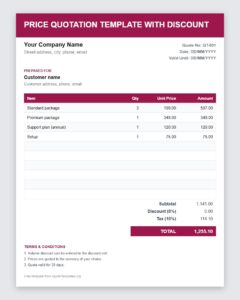
Download Free Price Quotation Template with Discount (Excel)


Frequently Asked Questions About Price Quotations
What is a price quotation used for?
It tells a customer exactly what you will charge for specific goods or services so they can decide whether to buy or compare offers.
How long should a quotation be valid?
Fifteen to thirty days is common. Choose a shorter period if your costs change quickly, and always print the expiry date on the quote.
Can I change the price after the customer accepts?
Generally not, unless the scope changes or the quotation says otherwise. That is why you should verify every figure before sending.
Should a quotation include tax?
Show tax as a separate line so the customer can see the subtotal, the tax amount and the final total. Follow your local tax rules.
What format should I send the quotation in?
Most businesses email a PDF because it keeps the layout intact. You can create the quote in Excel using this template and then save it as a PDF.
Is this price quotation template free?
Yes. You can download it, edit it and reuse it for your own business quotes at no cost.


