

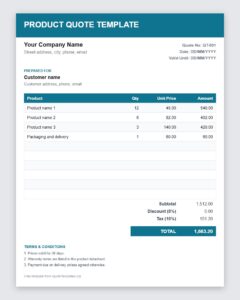
Send customers a clear price before they buy. This free product quote template helps sellers, retailers, wholesalers and suppliers create a professional product quotation with item details, quantities, unit prices, discounts and totals. It is supplied as a PDF inside a ZIP file, so you can print it and fill it in or complete it with a PDF editor.
What Is a Product Quote?
A product quote is a document a seller issues to a potential customer before a sale. It states the price of specific products, any discount, availability and how long the price is valid. Buyers use it to compare offers from different suppliers, and sellers use it to turn interest into an order. Because product prices can change with costs and demand, a quote fixes the price for a limited period and gives both sides certainty.
Product Quote vs. Invoice vs. Purchase Order
These documents belong to different stages of a sale. The quote is the seller’s offer. A purchase order is the buyer’s formal confirmation that they want to buy at the quoted price. The invoice is the seller’s request for payment after delivery. Sending a clear product quote first makes the next two documents simple, because the products, quantities and prices are already agreed.
What to Include in a Product Quotation
- Seller details: business name, logo, address, phone and email.
- Customer details: name, company and delivery address.
- Quote number and date: a unique reference and the issue date.
- Product list: name, item code or SKU, a short description, quantity and unit price.
- Discounts: trade, bulk or promotional discounts shown as separate lines.
- Taxes and shipping: tax rate, delivery charges and packaging costs.
- Total cost: the final amount the customer would pay.
- Availability and lead time: whether items are in stock and when they can be delivered.
- Payment terms: deposit, due date and accepted payment methods.
- Validity date: the last day the quoted prices can be accepted.
How to Create a Product Quote Step by Step
- Confirm the customer’s request. Check product types, quantities, specifications and delivery location.
- Check stock and costs. Verify current supplier prices and how many units you can supply.
- Calculate the price. Add your margin, then apply any discounts you have agreed.
- Fill in the template. Enter each item with its quantity and unit price and confirm the totals.
- Add shipping and terms. Include delivery charges, payment terms and the validity period.
- Send and follow up. Email the quote and contact the customer to answer questions and encourage a decision.
Pricing Tips for Product Quotes
Make sure your prices reflect the real cost of goods, packaging, handling and delivery. Offer volume discounts to encourage larger orders, but state the quantity levels clearly. If prices depend on exchange rates or raw materials, keep the validity period short. When a customer asks for several products, group them logically, for example by category, so the quote is easy to read. Highlight benefits such as warranty, free delivery or fast shipping, because they help justify your price.
Why Use a Product Quote Template?
A template keeps every quote consistent, speeds up your response to customer requests and reduces calculation errors. It also gives your business a professional image, which is important when buyers compare several suppliers. Once your business details and terms are in the template, you only need to enter the product information for each new customer.
Common Mistakes to Avoid
Typical mistakes include forgetting to state the validity date, leaving out shipping or tax, using unclear product descriptions and quoting products that are out of stock. Another mistake is sending quotes without a follow-up. Review each quote carefully before sending it, and keep a record of quotes sent so you can contact customers whose offers are about to expire.
Who Can Use This Product Quote Template?
Retail shops, wholesalers, distributors, manufacturers, online sellers, importers and exporters, and freelancers who sell physical products can all use a product quote. It is equally useful for business-to-business sales and for individual customers who ask for a price before buying.
Keeping Your Product Quotes Organized
Give every quote a unique number and save it under the customer name and date, so you can find it instantly when a buyer calls back. Keep a simple list of quotes that are still open and note their expiry dates. When a customer accepts, mark the quote as won and use it to prepare the purchase order and invoice. When a customer declines, record the reason if you can, whether it was price, timing or availability. These notes help you adjust future quotes, improve your margins and respond faster to the customers most likely to buy.
How to Use This Template
Download the ZIP file using the button below and extract the PDF inside it. Print the document and complete it by hand, or open it in a PDF editor that supports form filling or text annotations. Enter your products, prices and terms, review the totals, save a copy for each customer and send it by email or hand it over in person.
Download Product Quote Template




Download Free Product Quote Template (Excel)

Frequently Asked Questions About Product Quotes
What is a product quote?
It is a document that tells a customer the price and terms for specific products before they buy.
How is a product quote different from a price list?
A price list shows general prices for everyone. A product quote is prepared for a particular customer and request, and may include special discounts, quantities and delivery terms.
How long should a product quote be valid?
Fifteen to thirty days is common. Use a shorter period if your supplier prices change frequently.
Should I include shipping in a product quote?
Yes. Show shipping and handling as a separate line so the customer knows the total cost of receiving the goods.
How do I open the download?
The download is a ZIP archive. Extract it with your computer’s built-in tool, then open the PDF inside it with any PDF reader or editor.
Can I turn an accepted quote into an invoice?
Yes. After the customer accepts and you deliver the goods, copy the products, quantities and prices into an invoice and add the payment details.

